8 Best Webinar Platforms for Education

Todd Parmley




Running a successful webinar requires constant audience engagement. Engagement = audience members are actively participating: chatting in, responding to polls, asking questions, or interacting with your webinar in some way.
It's one of the most important metrics to track because it tells you whether your webinar is actually resonating with viewers or if they're tuning out. The more you understand your engagement patterns, the better you can fine-tune future webinars to keep audiences hooked.
So we've compiled this guide with all of our best practices to make your webinars more engaging. We'll walk you through how to prepare for webinars, record high-quality, attention-grabbing content, keep engagement going after webinars end, and use analytics to identify areas for improvement.
But before we get into any of that, our first (and arguably most important) tip to increase engagement: pre-record and automate your webinars.
We know what you're thinking, "Wait, aren't live webinars more engaging because you get to interact with audiences in real time?"
Here's what we've learned after 5+ years in this space — interactivity in traditional live webinars is actually kind of a nightmare. Hosts are stuck juggling too many things at once: delivering their presentation, reading chat messages, typing responses, manually triggering polls and CTAs at the right moments.
Even the best presenters find it’s nearly impossible to do all of this well simultaneously. They can’t realistically respond to every chat they receive, and it’s not uncommon for them to forget to trigger interactions as they present. So half the time, hosts don’t feel it’s worth the planning and effort to make a live webinar interactive, so they don’t even try.
As a result, most live webinars end up being pretty passive experiences for attendees; they’ll watch the presentation, and, at most, participate in a Q&A session at the end.
On the flip side, pre-recorded, automated webinars consistently see higher attendance and engagement rates. In fact, eWebinar users often report 3x higher attendance and 2x higher engagement after making the switch.
Here's why automation actually drives more engagement:
You can design your entire webinar around interactivity. Instead of scrambling to manage interactions on the fly, you pre-program every poll, question, and CTA exactly where you want them. You're intentionally building engagement into the experience from the ground up.
Hosts can actually focus on chat conversations. When you're not juggling presenting and managing chat, you can give thoughtful responses to every message. And if you're not available during a session, you can respond afterwards. Either way, no attendee gets left hanging.
Attendees show up when they're ready to engage. People tune in at their peak moment of interest, when they're mentally prepared to participate, not just whenever you happen to schedule a live session.
Now, let’s dive into our tips for creating interactive automated webinars that outperform live experiences.
To learn more about our automated webinar tool, eWebinar, start a 14-day free trial or tune into our demo below. (We use eWebinar to run our demo, so you’ll get to experience it for yourself.)
Now, some of the advice here may feel obvious. But it’s important to talk about prep work because even the absolute best engagement strategies won't save a poorly planned webinar. Here are the basics you need for a genuinely interesting, insightful, and engaging webinar.
You can't engage people if you don't know what they care about — and hosting an engaging webinar is a lot easier when you already know your audience’s interests and what they’re looking to get out of the presentation.
Before planning your webinar, get clear on who's attending and understand:
Instead of relying solely on assumptions, you can also conduct pre-webinar surveys or 1:1 interviews to gather detailed, actionable insights.
The better you understand your audience, the easier it is to create content that actually resonates and keeps them engaged.
Nothing kills engagement faster than a wandering, unfocused presentation. Nail down your topic and create a clear outline of what you'll cover before you start recording. This helps you stay on track, ensures you're delivering real value, and makes it easier to structure your interactions (polls, questions, CTAs) in logical places throughout the webinar.
The person presenting should know the material and be comfortable on camera. If you're not the subject matter expert, bring in someone who is — even as a guest speaker or co-host. Authenticity and expertise come through on screen, and audiences can tell when someone actually knows their stuff vs. when they’re simply reading from a script.
After the initial preparation, it’s time to create your webinar presentation and slide deck — with interactivity planned throughout the experience. This section covers:
You don’t want to start your webinar by just diving into the presentation. You need to warm up your audience first. A quick icebreaker question or poll is a great way to get people engaged right from the beginning. It could be something simple like, "Where are you joining from today?" or "What's your biggest challenge with [topic]?"
The goal is to set the tone that this is an interactive experience, not a one-way presentation. When attendees participate early, they're more likely to stay engaged throughout the rest of the webinar.
Another way to show audiences that you encourage their interaction is to invite them to chat in and ask questions. It sounds simple, but this explicitly tells audiences that you want to hear from them.
And you should invite their interaction throughout your webinar. Ask them questions, include surveys or polls, prompt them to share their thoughts, and leave natural pauses where they have time to type and reply.
Don't just talk at your audience. The more you welcome their participation, the more comfortable they'll feel jumping into the conversation.
We’ve created a standard script template that helps you plan for interactivity and set up your webinar for high engagement — download it here.
Again, one of the most significant benefits of automating webinars is that you can pre-program interactivity throughout the webinar. And you should absolutely take advantage of this. Do not use interactions too sparingly! Spread them throughout the entire webinar. The more you bake them into the experience, the better.
That said, you don’t want to bombard attendees, either. A good rule of thumb is to go no more than 3 or 4 minutes without an interaction. Naturally, there will be more at the beginning and end of your webinar.
Now, there are typically three motivations for placing interactions. The first, and most obvious one, is to hold attendees' attention and keep them engaged in the webinar. The second is to test comprehension as webinars progress (which is typically most relevant in training or onboarding webinars). The third is to gather actionable data to use after webinars are over, for example, to segment follow-up and guide that messaging.
With those motivations in mind, think about what’s most important to you to use interactions strategically.
Regardless of your motivation, though, you should always use a variety of interactions to keep things interesting for attendees:
You should also put some thought into making your interactions compelling. Write attention-grabbing copy for your polls and questions, throw in a GIF or emoji to add personality, and make your CTAs feel natural rather than pushy. The quality of your interactions matters just as much as the quantity.
Conditional interactions let you tailor the webinar experience based on attendees' responses or behavior. Essentially, you create interaction chains where if someone answers one way, they see a specific follow-up interaction, and if they respond differently, they see something else.
For example, say you're hosting a webinar on growth marketing strategies. You could ask attendees, "Which area do you need the most help with right now?" with options like blog content, email marketing, or social media. Someone who selects "blog content" would see a follow-up CTA for your content strategy guide, while someone who selects "email marketing" would see a resource about email campaigns instead. Each person gets content that's actually specific to their challenge.
You can also trigger interactions based on attendee behavior. For example, you can ask a different question based on whether an attendee is watching from their phone or desktop.
This keeps the experience relevant for each attendee and prevents people from tuning out because the content doesn't match their needs.
Of course, one of the most important and effective ways to engage with your audience is through chat. This two-way communication makes webinars feel more personal and keeps attendees invested in the experience.
With automation tools like eWebinar, hosts can chat with attendees in real time during sessions or respond afterward. Either way, attendees receive thoughtful responses to their questions rather than being left on “Read”. And if hosts won't be available to respond immediately during the webinar, they can set up an automated message letting attendees know when they can expect a response.
Unlike live webinars, live chat is private (vs. public), so attendees don’t feel intimidated to chat; they don’t have to post their message in a massive public chat or wait for a live Q&A where they’re asking questions in front of a live audience. They can message hosts directly, and all attendees always receive a reply.
Keep attendees curious about what's coming next by teasing content throughout your webinar. Drop hints like "We've got a special resource to share at the end" or "Coming up in a few minutes, I'll show you exactly how we [achieved specific result]."
These little previews create anticipation and signal there’s content ahead worth waiting for, giving people a reason to stay tuned.
Give your webinars a fun, challenging element by incorporating quizzes and setting completion requirements. For example, you could require attendees to complete a certain number of quizzes or achieve a minimum score (like 80%) to "pass" the webinar or to receive some kind of reward.
Gamification works exceptionally well for training webinars or educational content where you want to ensure attendees are truly learning and retaining information. Quizzes keep attendees engaged and accountable — they can’t just passively watch, they have to prove their understanding as they go.
Once you've planned your presentation, put together your slide deck, and mapped out where you want to incorporate interactivity, you're ready to record your webinar.
Before you hit “record,” consider doing a test run with a live audience or a few peers to get feedback. This helps you identify where people have questions, where content needs to be clearer or more comprehensive, and whether your planned interactions actually work. It's also a good time to double-check that all the media in your slide deck is clear and easy to read.
Taking the time to test your webinar content with others and improve it is especially worthwhile with automation; once you record the webinar, you never have to do it again.
However, you shouldn’t stress about your webinar being 100% perfect. Attendees aren’t expecting perfection; they just want an engaging, interactive experience that’s worth their time. If they learn what they’re expecting or gather what they were hoping to from your webinar, chances are, they’ll leave pleased. And you can always edit your recordings — clipping together your best takes — so you can compile the most polished version of your presentation.
When recording your webinar, be sure to:
You don't need a Hollywood-level production, but recording quality directly impacts engagement. Shoddy video quality, hard-to-read visuals, or unclear audio will cause attendees to drop off — they won't stick around if they're squinting at blurry slides or struggling to hear you and absorb the material.
Another (often-overlooked) aspect of recording an engaging webinar is adding captions.
Yes, captions increase accessibility so that those who are deaf or hard of hearing can tune in to your webinars, but many studies have shown that captions also boost engagement by helping people follow along, understand, and really retain what they’re learning — even when they’re watching with the sound on. These studies have also found that viewers with captions are more likely to watch content through to the end.
After you record your webinar, you’ll give your webinar a descriptive, catchy title and create a detailed, attractive registration page to grab potential registrants’ attention and incentivize them to sign up.
When designing your webinar’s registration page, you should include:
A compelling headline. For example, something like "How to 2x Organic Traffic With On-Page SEO [Registration Ends Soon]" is more enticing than "Get Traffic With Content Marketing (Webinar)" because it includes specific details, teases the desired outcome, and creates a sense of urgency.
An overview of the main topic and an agenda of what will be covered
Days and times people can join the webinar. Is it a one-time event, does it run on a recurring schedule, or can people watch it on demand?
Information on who’s delivering the presentation. Include a headshot and short bio for each speaker to establish their credibility. List their current role, how long they've been in the industry, and other qualifications that speak to their expertise.
A simple registration form. Registration forms shouldn’t overwhelm potential registrants with a dozen and one questions. Stick to the essentials: names, email addresses, and, if applicable, information about their company or role.
To learn more, check out our guide on How to Create a High-Converting Webinar Landing Page or see our list of 28 Webinar Landing Page Examples.
Then, after registrants sign up for your webinars, you should send out reminder emails a day or a couple of hours before the webinars start so they don’t forget to show up.
The last step to set your webinar up for success is to create a flexible schedule that offers attendees multiple viewing options. When people can choose when they watch, and tune in at their peak moment of interest, they're far more likely to show up and actively participate. And this is what really drives higher engagement — you can more easily get people into your webinars by providing several ways to tune in (vs. waiting for them to attend at a specific time, which they may forget or ditch).
We suggest offering a mix of scheduling options:
And always provide replay links so attendees who miss a session or want to rewatch can access the content later.
Note: When running webinars on a recurring schedule, enable automatic time zone adjustments in your webinar software (if available) so the platform automatically adjusts the schedule to attendees' local times. This way, if you set webinars to run at 10 a.m. and 2 p.m., they'll play at those times no matter where attendees are located. This prevents attendees from having to join at odd hours — when they're far less likely to show up or engage.
After your webinars end, follow up with attendees while your content is still fresh in their minds. This is your chance to drive the action you were building toward during the presentation — whether that's booking a demo, downloading a resource, signing up for a trial, or scheduling a consultation.
Send a follow-up email within 24 hours that:
Don't just send a generic "thanks for joining" email; use this as another opportunity to win conversions.
It’s also a good idea to send out a post-webinar survey to encourage attendees to share their experiences and provide feedback on what they'd like to see in future presentations.
Here are three strong foundational questions you can ask in your post-webinar survey:
The first question lets you understand what was most valuable to viewers, the second helps identify pain points and the specific goals viewers had going into the presentation, and the third helps generate ideas for new webinar content.
Read more: Best Webinar Survey Questions to Ask Before, During, and After
While feedback surveys offer important insights and help you uncover improvement areas for future webinars, webinar analytics data is also invaluable in understanding the success and effectiveness of your webinars.
The key metrics to look out for include:
You can also learn more about how to interpret webinar analytics in our guide here.
If you're looking for a tool that makes it easy to implement everything we've covered in this guide, eWebinar is built specifically for creating interactive, highly engaging automated webinars. Our platform includes:
The largest selection of engagement tools (20+, including quizzes, polls, Q&As, CTAs, special offers, tips, feedback requests, and more) so you can pre-program interactivity throughout your webinar experience.
Asynchronous chat that lets webinar hosts respond to attendees during the webinar in real-time or after webinars end — our tool is totally unique in this feature, and the flexibility to get back to attendees after webinars end means hosts don’t have to monitor chats around the clock to engage with attendees.
Flexible scheduling tools so you can give registrants a variety of options to join webinars, and they can tune in when it’s convenient for them.
Automated reminders before and after webinars so registrants don’t miss out, and you can continue engagement after webinars end.
Detailed webinar analytics — including heatmaps — so you can dig into engagement, understand precisely what prompted attendees to interact, and gather insights to improve webinar experiences continuously.
Our platform is designed for ease of use. It requires zero training, so anybody can leverage our solution to easily create webinars that hook audiences and drive engagement from start to finish — no technical expertise required.
eWebinar offers the most comprehensive interaction gallery of all webinar solutions, so you can get as creative as you wish here and pre-program a variety of interactive elements during your webinar.
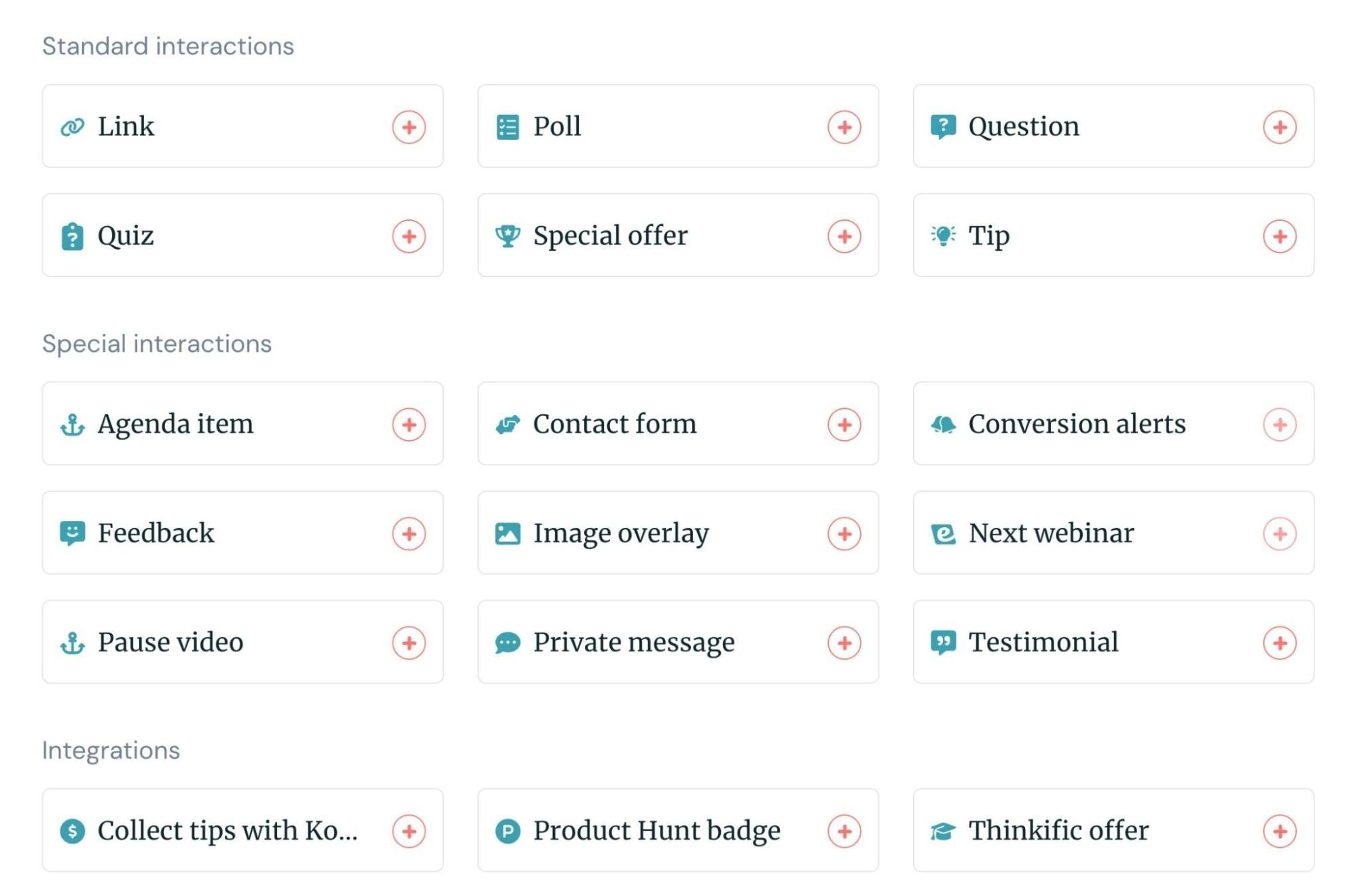
Our platform also uniquely offers AI-powered interactions. Our system can suggest interactions based on your webinar topic, provide pre-written copy, and tell you exactly where to place them.
But what our users love most here is our user-friendly interactions editor.
A lot of other automated webinar software makes it super complicated to pre-program interactions. You have to open your webinar recording in a separate window, identify the exact timestamp you want an interaction to appear, and then enter that timestamp into the webinar platform.
Then there’s no previewing interactions to double-check yourself. You have to publish webinars to see if interactions appear where you want them (and if not, unpublish, and start the process over).
Adding interactions is such a cumbersome task that most webinar creators get frustrated halfway through and skimp on interactions just to spare themselves the tedious work of placing each one. Then engagement suffers because the webinar includes only a couple of interactions.
eWebinar uncomplicates things by displaying our interactions editor directly within your webinar recording. You can scroll to the exact moment you want an interaction to appear, select it, and effortlessly place it in the webinar. Look at how easy it is:
Creators can quickly and easily add all of the interactions they’d like, without any of the frustration.
Now, the other thing that sets us apart is that we make it easy for attendees to track and reply to all interactions.
We noticed that in other webinar software, interactions replace one another when new ones appear. So if an attendee doesn’t finish replying in time, the interaction poofs away, and a new one takes its place. Sure, this keeps attendees alert and creates some urgency to respond to interactions, but it can also be stressful.
During eWebinar experiences, interactions appear on the right-hand side of the recording, and our system keeps a history of all interactions so attendees can scroll back through and easily enter their replies. They don’t have to speed reply or risk getting cut off halfway through a response and missing out.
We've built our interaction tools to be effortless for both creators and attendees, so everyone benefits from truly engaging webinars.
Our asynchronous chat model means you never miss an opportunity to engage directly with audiences. You can respond in real time as chats come in if you’re available — and if not, you can get back to participants after webinars end via email. Our system keeps a log of all chats you receive so you (and all other moderators) can review chats and make sure they all receive a reply.
Our system supports a variety of scheduling options — one-time events, recurring schedules (with automatic time zone adjustments), on-demand, and just-in-time viewing — and lets you combine options so you can provide attendees with multiple ways to tune in.
Our system also enables you to offer attendees instant replay links (without registering for a session first), so they can access them anytime via email.
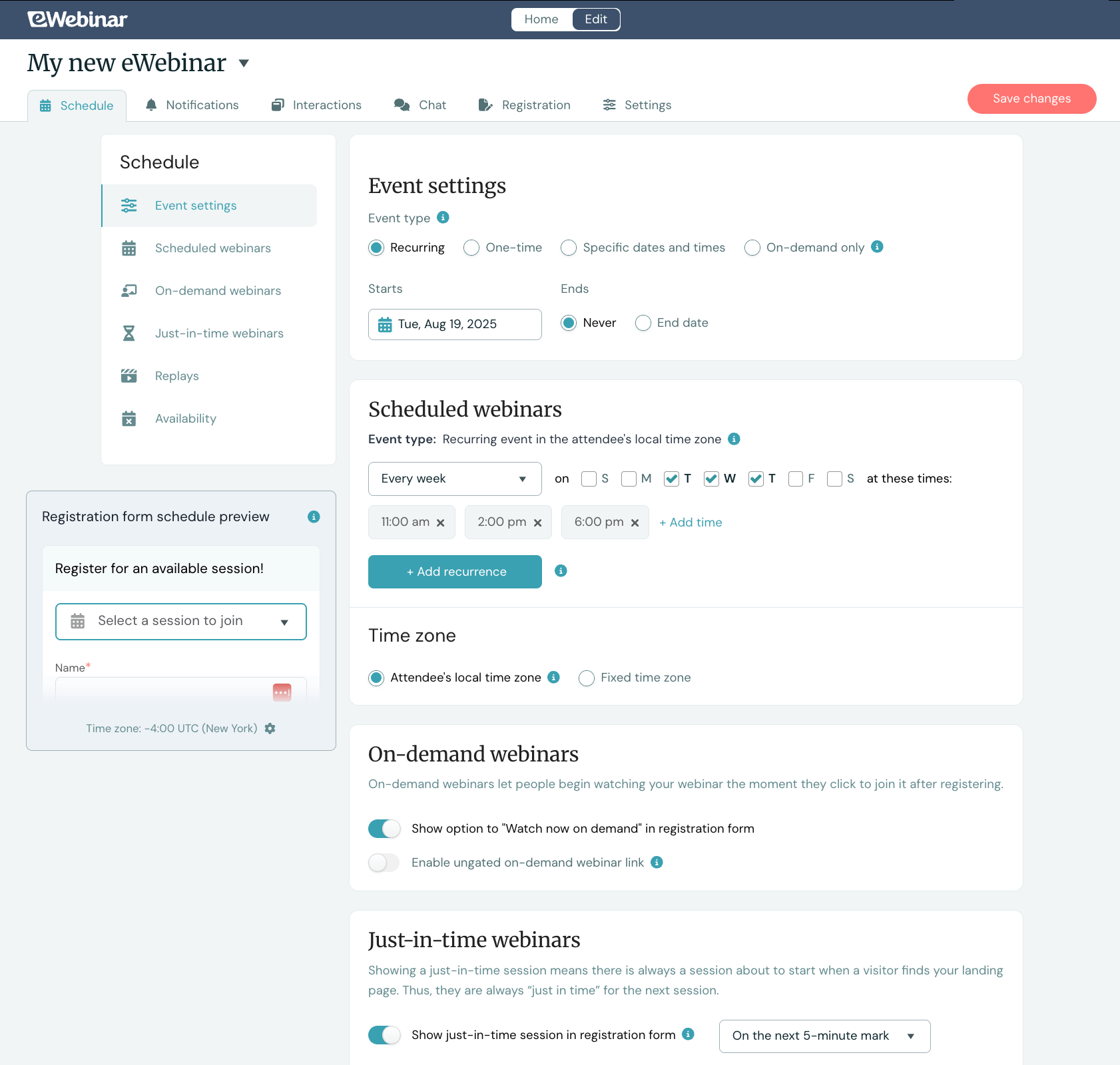
This way, attendees can easily watch your webinar at a time that works for them, when they’re most interested in engaging with content.
eWebinar lets you pre-schedule webinar reminders and follow-ups, so you don’t have to send them manually.
Our system automatically sends reminders one day and one hour before webinars begin, so attendees who registered for a specific time slot don’t forget to tune in. Then, it sends follow-ups five minutes after webinars end so attendees receive an immediate recap of the webinar and a clear CTA to convert while your content is still fresh in their minds.
You can also modify these schedules or add other reminders and follow-ups to this queue. Customize the messaging and timing once, and our system handles the rest.
Our platform tracks all of the key metrics you need to measure webinar success: registration rates, attendance rates, watch times, engagement rates, and conversions. It even offers a detailed conversion funnel chart that shows you the number of visitors, registrants, attendees, and conversions, as well as drop-off rates between each step, and total revenue.
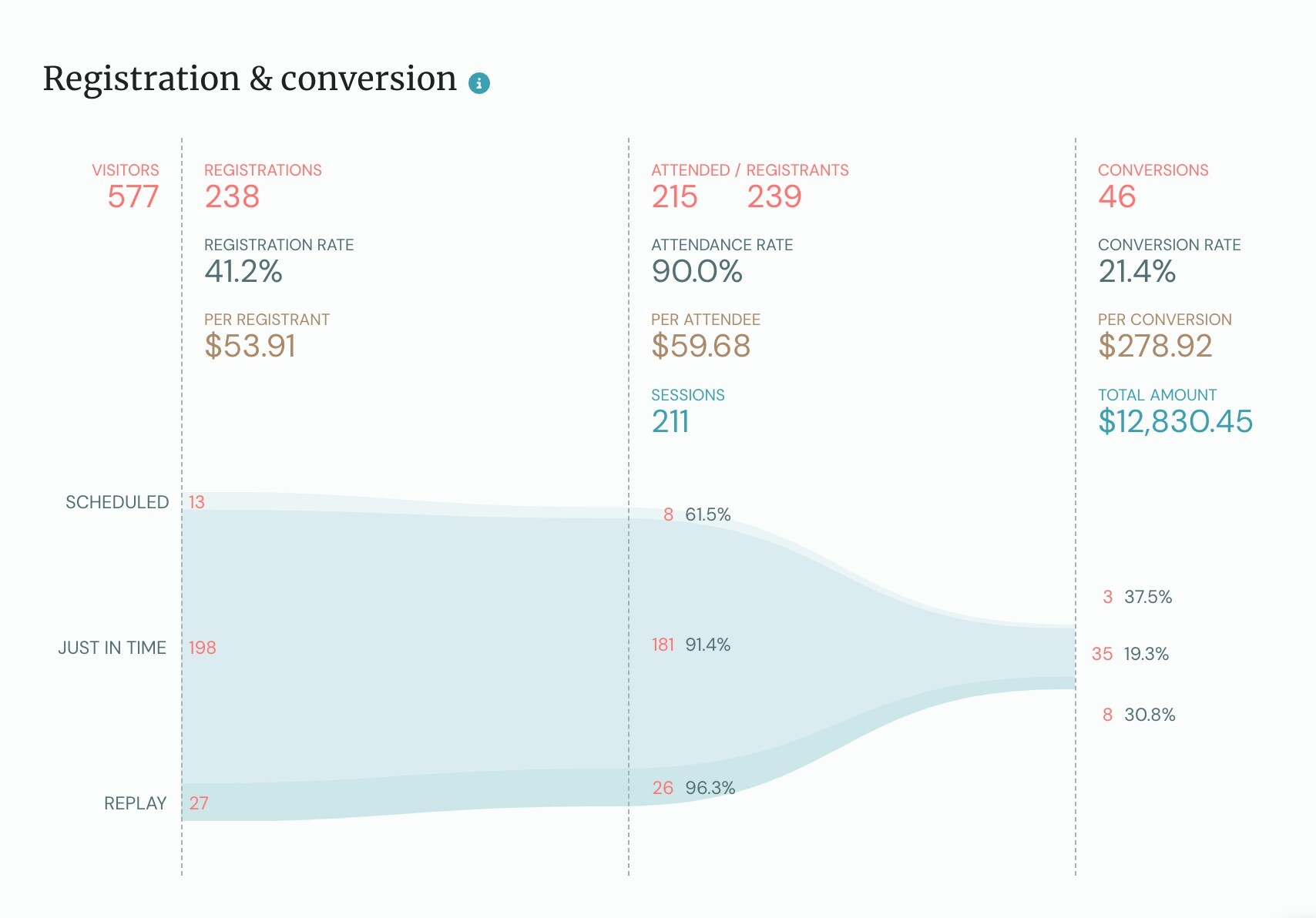
But we also offer something no other automated webinar platform does: engagement heatmaps.
Our heatmaps show you the exact moments in your webinar when engagement spiked or dropped. You can see exactly when attendees chatted in, liked or reacted to content, and what sparked that engagement. Then, you can see where engagement drops off or when attendees exit webinars.
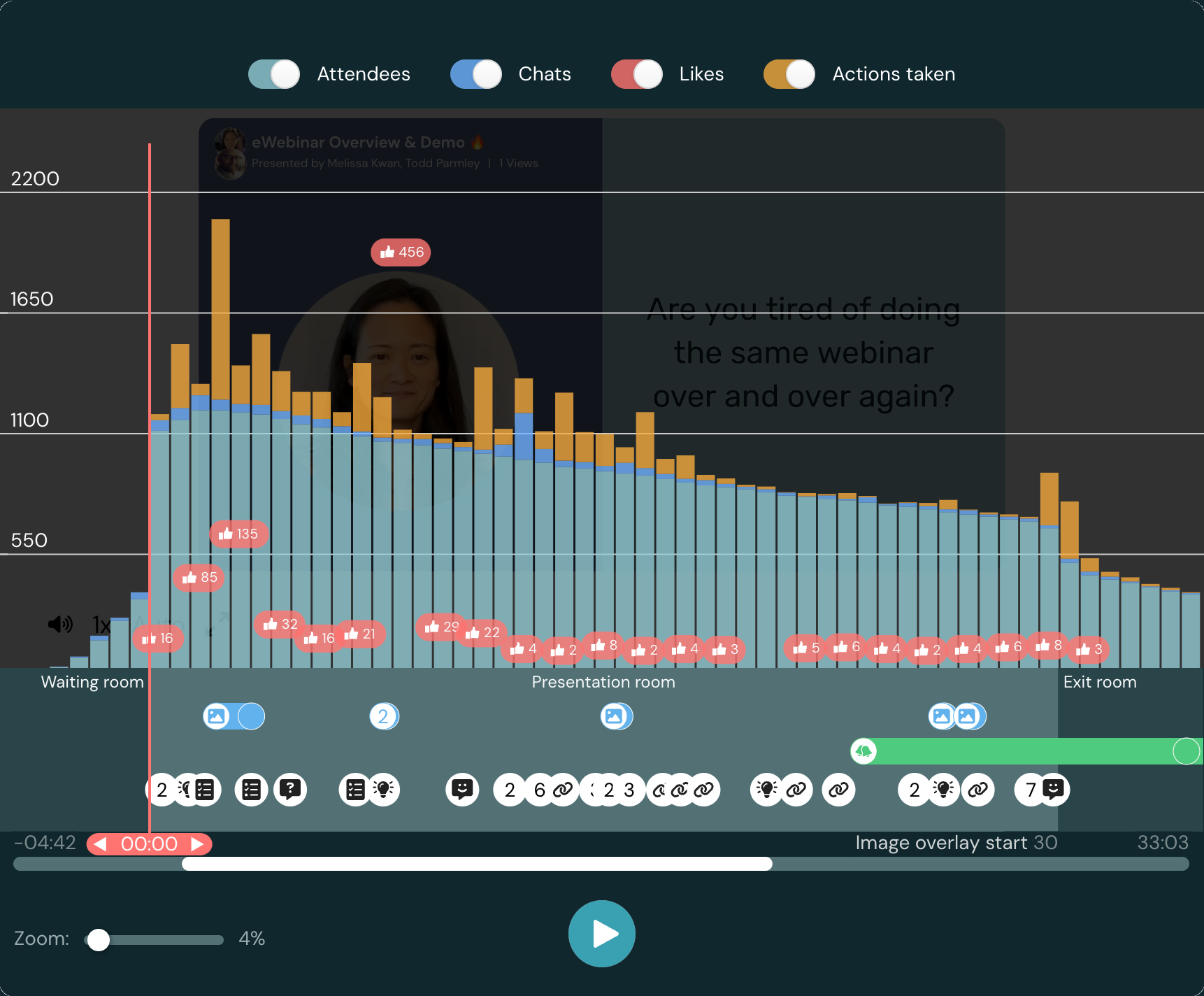
Heatmaps let you easily determine the most and least engaging moments of your presentation so you can double down on what interests users and identify ways to liven up webinars.
Start our 14-day free trial to see how easy it is to build engaging, interactive webinars in our system. You can also learn more about eWebinar and see our engagement features in action by joining our demo below.
Comience hoy mismo su prueba gratuita de 14 días.